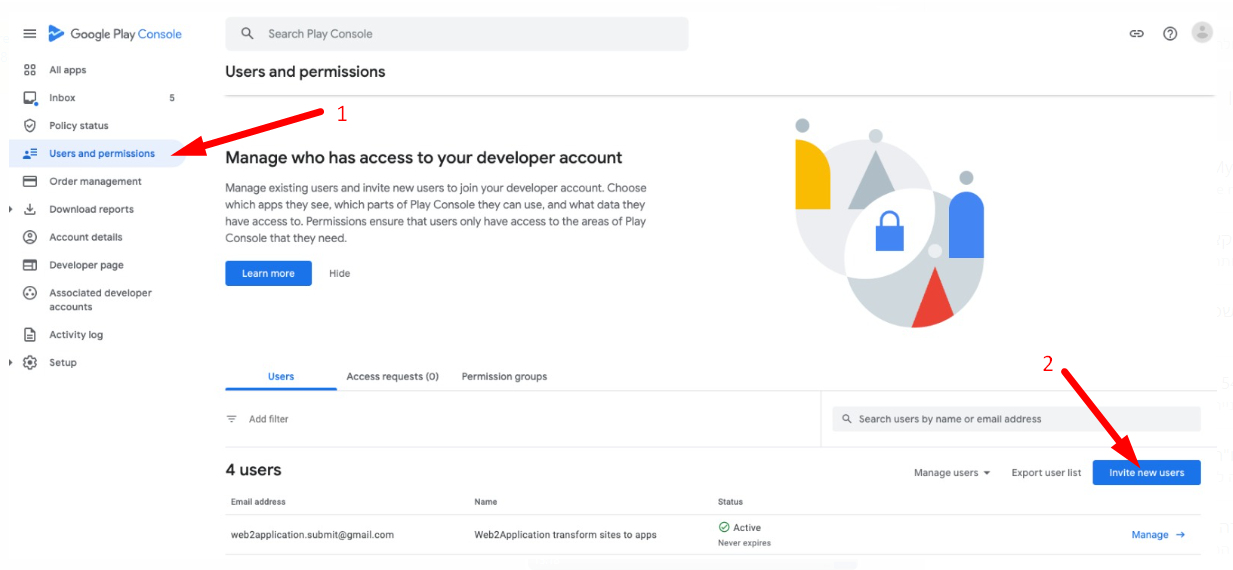
Share google play developer account access
After having a developer account in google you probably want to upload some apps. 🙂 If you don’t upload the app by yourself, the best way to let your developer upload the app to your account is by sharing access with him and giving him permission. The process is very simple: Enter your google play console and click settings and …
Continue Reading
how to open google play developer account ?
In order to upload an application and publish it on Google Play for Android users to download your application, you need a Google Play developer account. The process of opening a Google Account is fairly easy and costs only $ 25, a one-time payment to Google. Here’s how to open your own Google Play Developer account, Step 1: Log in …
Continue Reading
How to test your app with APK file
-
nir zin
-
July 23, 2023
-
Android, Course
-
0 Comments
How to test your app with an APK file for Android Applications Before we submit the app to google play and apple store, it is recommended to test the application on a real Android device. In order to install your application manually on an android phone, you need a file called APK. After you request us the APK file, we …
Continue Reading
Enable Push Notifications with google firebase
One of the important things about apps is the push notifications ! With push notifications you can engade your users with news, special offers, coupons etc direclly on their mobile phones. Here is How To Enable Push Notifications with google firebase: Enter https://console.firebase.google.com and open an account (with your Gmail account). Click “Add project”. Enter the project and click “Add app” …
Continue Reading
How to complete the details in Google Play Console and submit for review by Google Play Store (publish)
This article will explain and help you publish your new app in the google play store. After you asked us to upload the app to your google play developer account, We uploaded a sign APK file to your account. Now, Google requests details about the app, content rating, prices, countries where the app will publish, screenshots, etc. Before starting, it …
Continue Reading
Share FireBase account with users
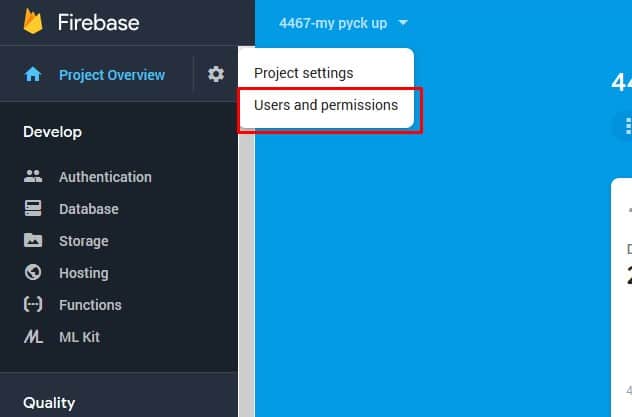
Enter https://console.firebase.google.com and open an account (with your Gmail account). Click “Add project”. Enter the project name (App Name). 4. Now, enter Users and permissions. 5. Click add member and enter our submit team mail: [email protected]. The role needs to be Owner.
Continue Reading