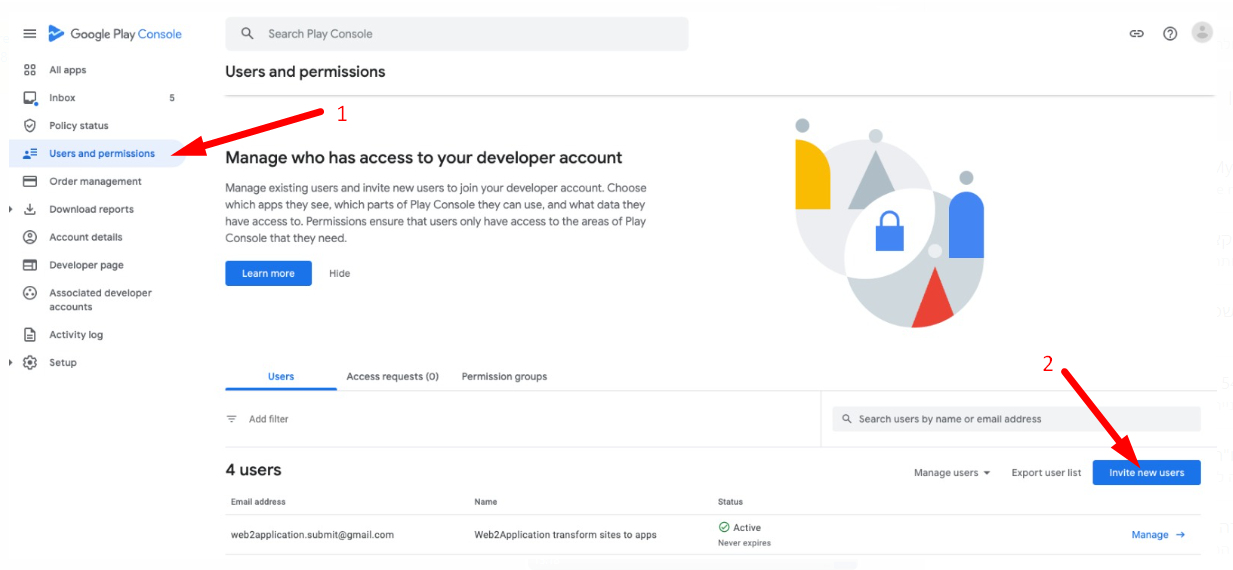
Share google play developer account access
After having a developer account in google you probably want to upload some apps. 🙂 If you don’t upload the app by yourself, the best way to let your developer upload the app to your account is by sharing access with him and giving him permission. The process is very simple: Enter your google play console and click settings and …
Continue Reading
8 Reasons A Mobile App Will Benefit Your Ecommerce Store
-
nir zin
-
July 23, 2023
-
Marketing
-
0 Comments
Did you know there’s an easy way to boost your brand and strengthen your customer base, while increasing your sales? It may sound too good to be true, but it’s not. All of this is possible by creating a mobile app for your online store. In today’s world technology is about convenience and mobility, meaning an increasing majority of people …
Continue Reading
How to Open a Developer Account in Apple
How to Open a Developer Account for the Apple Store: Before starting, according to Apple’s requirements, the developer account holder must own Apple’s device for security authentication. If you do not have a physical device. (iPhone / Ipad / Imac), You will need to contact Apple support and ask them for help and account approval. 1: Go to URL …
Continue Reading
Important points when building an app for a business
There is a fundamental difference between a responsive site and an application in google play and the App store. The main and most fundamental difference is the concept. A responsive site shows the business, services, and/or products to a surfer who enters the site. In installing an application from the stores, the user already knows the business and expects to …
Continue Reading
How to build an app with the popular WordPress page builder – ELEMENTOR
In this tutorial, we will explain how you can create or upgrade your WordPress website to an effective and useful application using the popular WordPress page editor – ELEMENTOR. All that you new to create your app is: 1. Elementor plugin – we advise using the pro version because it’s important to have updates for the elementor plugin and the …
Continue Reading
Enable Push Notifications with google firebase
One of the important things about apps is the push notifications ! With push notifications you can engade your users with news, special offers, coupons etc direclly on their mobile phones. Here is How To Enable Push Notifications with google firebase: Enter https://console.firebase.google.com and open an account (with your Gmail account). Click “Add project”. Enter the project and click “Add app” …
Continue Reading
How to test your app with APK file
-
nir zin
-
July 23, 2023
-
Android, Course
-
0 Comments
How to test your app with an APK file for Android Applications Before we submit the app to google play and apple store, it is recommended to test the application on a real Android device. In order to install your application manually on an android phone, you need a file called APK. After you request us the APK file, we …
Continue Reading
how to open google play developer account ?
In order to upload an application and publish it on Google Play for Android users to download your application, you need a Google Play developer account. The process of opening a Google Account is fairly easy and costs only $ 25, a one-time payment to Google. Here’s how to open your own Google Play Developer account, Step 1: Log in …
Continue Reading
How to turn your WordPress site into a free android native application?
-
nir zin
-
July 23, 2023
-
Marketing
-
0 Comments
Do you have a WordPress site? Now you can turn your WordPress site into a free android native application in 5-minute for free! How does It work? It’s quite simple, we take you your responsive site that fits mobile browsers and put it into a native application. The combination allows enriching the site with the capabilities of the phone such …
Continue Reading
How to send Push Notifications throw the wordpress plugin
-
nir zin
-
July 23, 2023
-
general support, Plugin
-
0 Comments
In order to send push notification to all your application users go to “Send Push” on you WordPress admin menu. Fill the Push Title and the Push Message that are required fields. You can select a special image that will replace your app logo in the push by pressing the select image button or by copy the full URL of …
Continue Reading