Smart Push Notifications
- nir
- July 23, 2023
- web to applicataion features
- 0 Comments
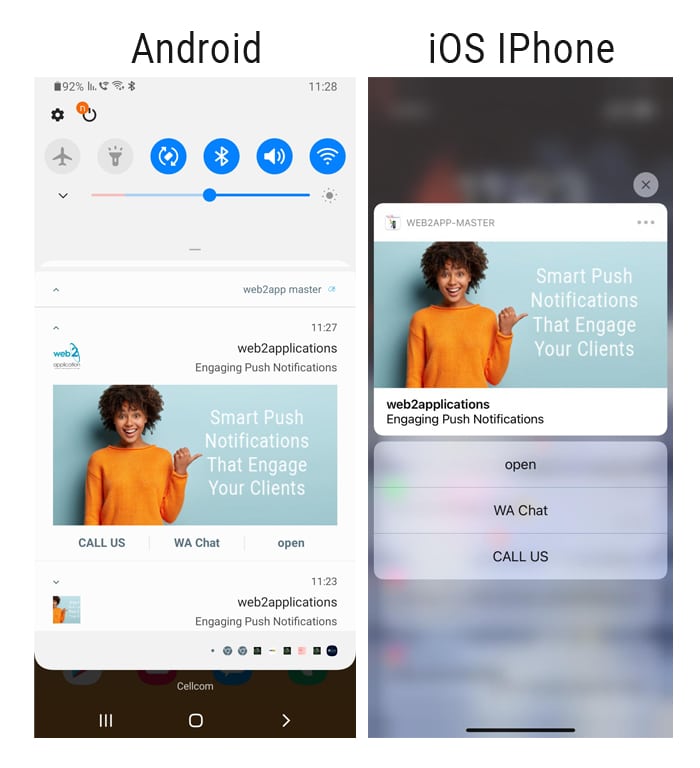 We always try to improve and provide our customers with the best tools to promote their business.
That’s why we invested in and built a smart push system that increases the conversion rate through advanced features such as:
– A special sound for your application so that the customer will recognize that you sent him a message according to the sound.
– Option to add buttons within the push itself to motivate the customer’s action, such as sharing, calling, chatting, etc.
– Attaching a large image to the push to stimulate the customer to click and enter the content inside the app.
– The push links to specific content on the app so that when clicked, the customer comes directly to the content or product.
– Schedule push notifications – Never forget to send a message.
How to setup and send smart push notification
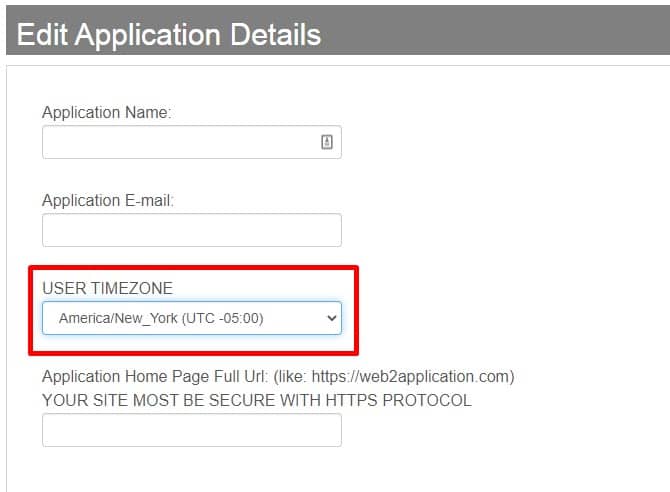
1. Check your app time zone inside “Edit Application Details”.
2. When you send the push, select “schedule this push” and select date and time.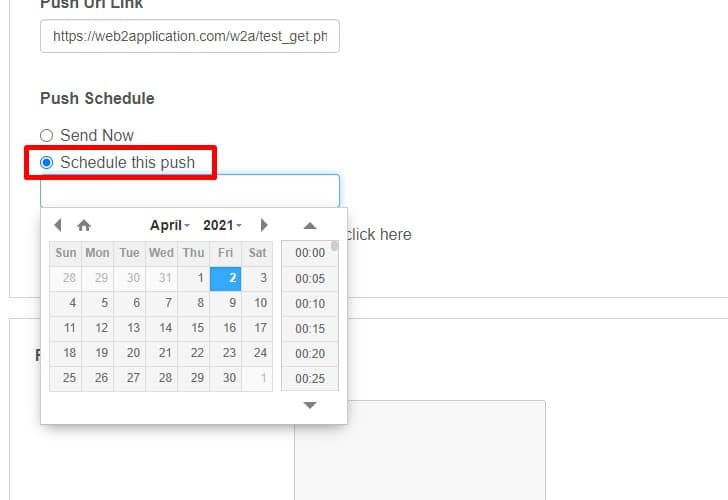
To select your special sound and add buttons to your push notifications, go to to the “premium configuration” screen and search for the push settings.
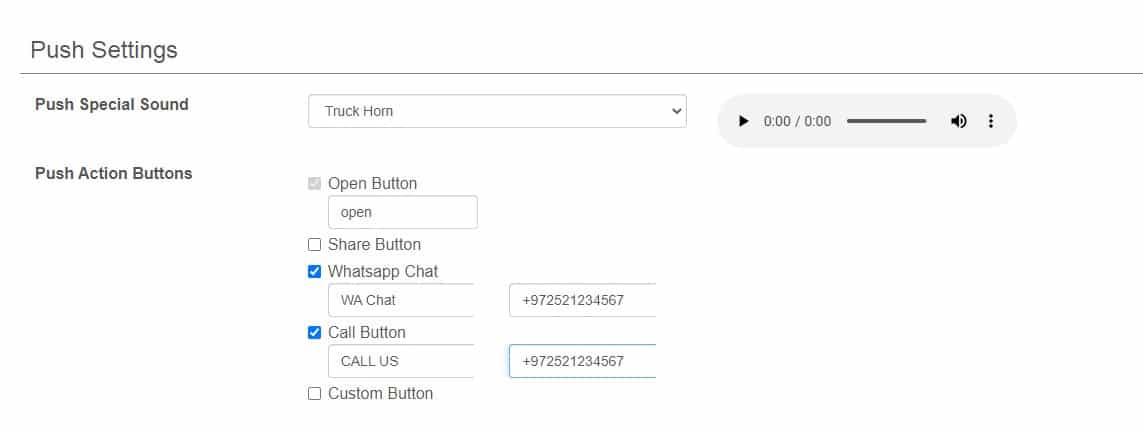
Here you can set up the sound and buttons for your push.
After the change, you need to close and open the app couple of times to clear the app/phone cache.
Send Push Notification
Enter the “Send Push Notification” screen.
Fill in the push details and press “Send it now!”.
The push will be sent to all your Android, iOS, and Web users.
What Are Smart Push Notifications?
Smart push notifications are advanced messages sent directly to your app users’ devices, designed to increase engagement and conversion rates. With Web2Application, you can customize notifications with special sounds, interactive buttons, large images, and deep links that take users straight to relevant content in your app.
Key Features of Web2Application Smart Push Notifications
- Custom Sounds: Choose a unique notification sound so your users instantly recognize your app’s messages.
- Interactive Buttons: Add buttons within push notifications to encourage actions like sharing, calling, or chatting.
- Large Images: Attach eye-catching images to your notifications to boost click-through rates.
- Deep Linking: Link notifications to specific app content or products for a seamless user experience.
- Scheduling: Plan your notifications ahead of time to never miss important communication moments.
How to Set Up and Send Smart Push Notifications with Web2Application
- Verify your app’s time zone under Edit Application Details in the dashboard.
- Go to the Send Push Notification screen.
- Fill in the notification details and select Schedule this push if you want to send it later.
- Configure custom sounds and buttons under Premium Configuration > Push Settings.
- Send your push notification to all Android, iOS, and web users.
- After changes, restart the app a few times to clear cache and apply new settings.
Why Choose Web2Application for Smart Push Notifications?
Web2Application offers an easy-to-use platform to convert your website into native apps with built-in smart push notification features. Whether you want to promote new content, products, or offers, our push system helps you engage users effectively across Android, iOS, and web platforms.
Related Resources
- Free How to Create an App Course
- Complete Guide to Push Notifications
- WordPress Integration with Web2Application
Frequently Asked Questions about Smart Push Notifications
What devices support Web2Application smart push notifications?
Web2Application smart push notifications are supported on Android and iOS native apps, as well as web browsers for web app users.
Can I schedule push notifications in advance?
Yes, you can schedule push notifications to be sent at a specific date and time using the scheduling feature in the Web2Application dashboard.
How do I add custom sounds and buttons to my push notifications?
Custom sounds and interactive buttons can be configured under the Premium Configuration > Push Settings section in your app dashboard.
Do I need a premium plan to use smart push notifications?
Yes, smart push notification features including custom sounds, buttons, and scheduling require a premium subscription on Web2Application.
How can I test push notifications before sending them to users?
You can test push notifications by sending them to your own devices after setting up Firebase in the Push Settings of your app dashboard.
Get Started with Web2Application Today

Learn more about how Web2Application can help you convert your website into powerful native apps with smart push notifications and other advanced features.
Frequently Asked Questions
What devices support Web2Application smart push notifications?
Web2Application smart push notifications are supported on Android and iOS native apps, as well as web browsers for web app users.
Can I schedule push notifications in advance?
Yes, you can schedule push notifications to be sent at a specific date and time using the scheduling feature in the Web2Application dashboard.
How do I add custom sounds and buttons to my push notifications?
Custom sounds and interactive buttons can be configured under the Premium Configuration > Push Settings section in your app dashboard.
Do I need a premium plan to use smart push notifications?
Yes, smart push notification features including custom sounds, buttons, and scheduling require a premium subscription on Web2Application.
How can I test push notifications before sending them to users?
You can test push notifications by sending them to your own devices after setting up Firebase in the Push Settings of your app dashboard.
Ready to turn your site into an app?
Create your app with Web2Application — convert your website to Android and iOS apps.